Edit an ODCS contract
Work with contract fields while keeping YAML as the authoritative document.
Command or action
DataRaft: Open Contract YAML Editor
What this does
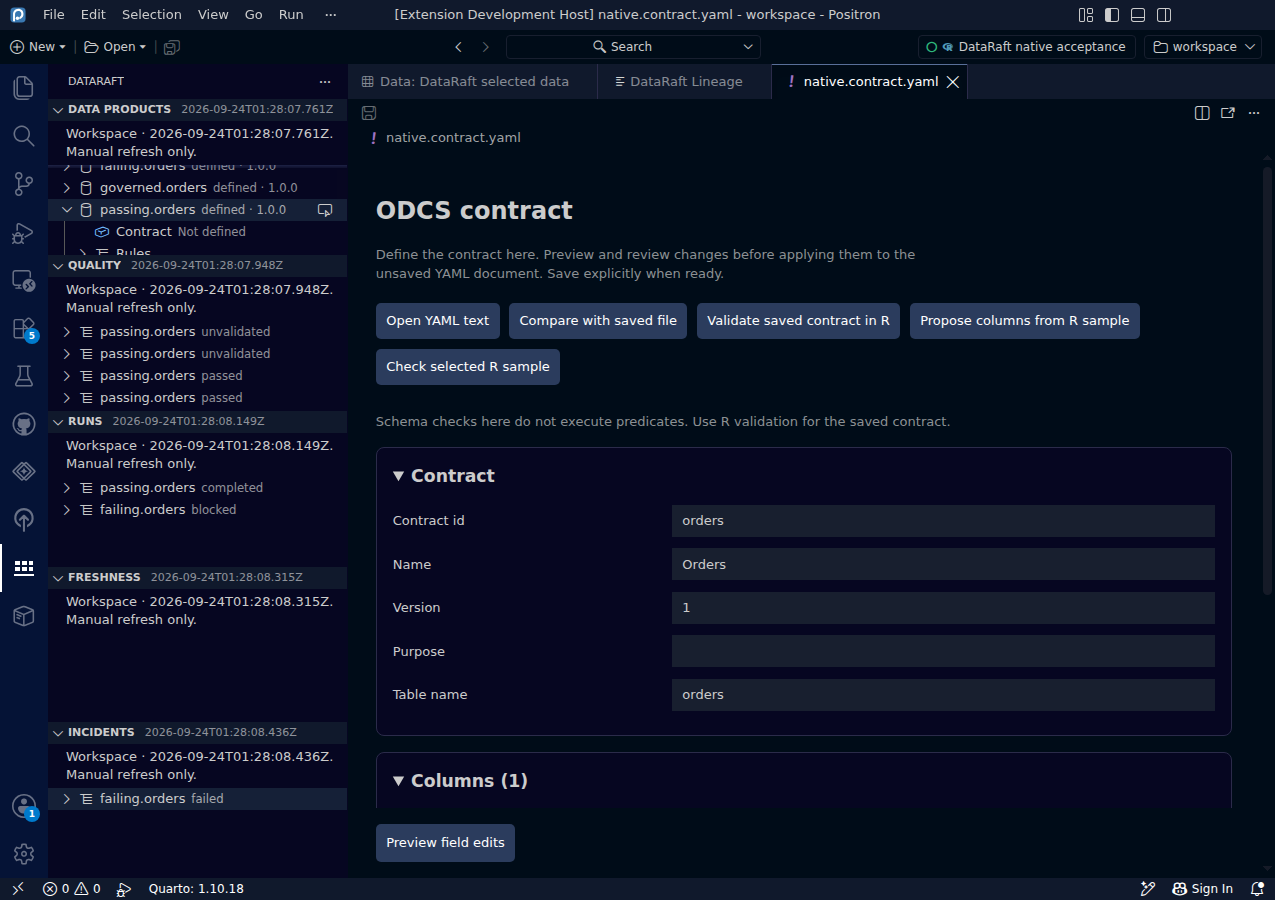
The custom editor helps you edit an ODCS 3.2 YAML contract. Fields are grouped by identity, schema and quality, and the underlying YAML is available in a collapsible panel. It preserves comments and unknown metadata. The YAML document remains the source of truth.
Try it
- Open a saved ODCS contract YAML file.
- Choose DataRaft: Open Contract YAML Editor.
- Edit a field, or use the controls for columns and quality rules.
- Choose Preview field edits before applying anything.
Read the screenshot
The form belongs to the actual native.contract.yaml file in the synthetic workspace. The screenshot is captured in Positron; the same offline YAML editor is available in VS Code without a live R session.
Keep in mind
Editing a contract document does not validate a full dataset. The portable dr_contract_yaml() metadata export is not an executable ODCS contract. R-based validation and bounded sampling are separate explicit commands and require Positron.
0d55d40. Screenshot automation: 0d55d40. Successful native capture run ↗