View bounded rows inside R
Open a small data preview in the native Data Explorer.
Command or action
DataRaft: View Bounded Rows in R
What this does
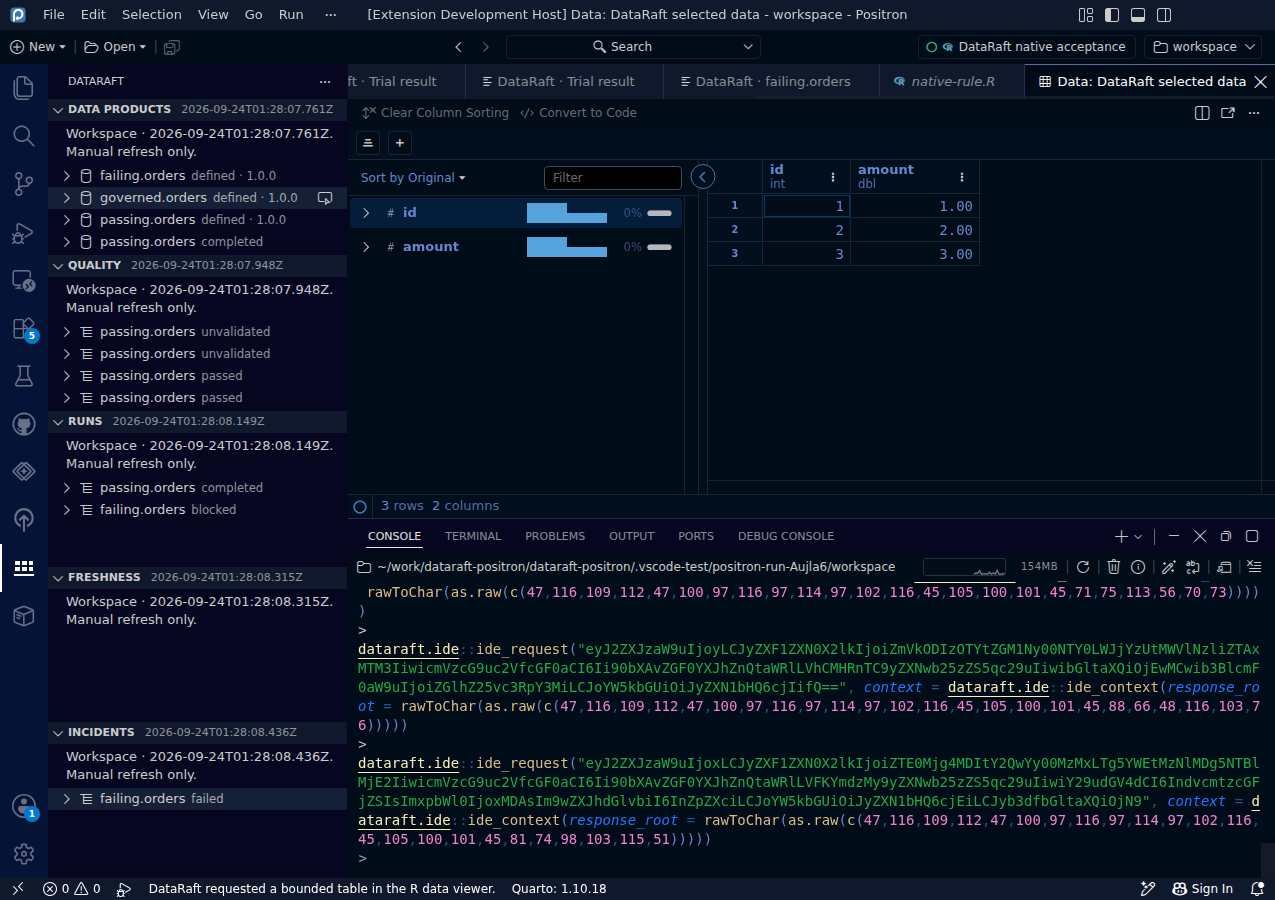
The explicit View Bounded Rows in R command opens a bounded existing table or retained tabular result in Positron's native R Data Explorer. The extension receives an acknowledgement, not the table cells.
Try it
- Select a viewable table or retained successful result.
- Run View Bounded Rows in R.
- Inspect the native Data Explorer's columns and row count.
- Configure
dataraft.maximumRowsif a different preview limit is appropriate.
Read the screenshot
The capture uses dataraft.maximumRows = 3 and shows three rows and two columns. The underlying successful result has twenty rows. This is a bounded view, not evidence that all rows were inspected visually.
Keep in mind
The default preview limit is 100 rows and the maximum is 1,000. Model manifests and results without retained viewable output are not supported by this command. Data remains in the R viewer, but anyone with access to that viewer can see the selected rows.
0d55d40. Screenshot automation: 0d55d40. Successful native capture run ↗