Locate a failed rule in R code
Map a retained failure to a verified location in your R source.
Command or action
DataRaft: Show R Rule Diagnostics
What this does
After a trial, DataRaft can map a failed function rule back to a verified R source location. This command uses the retained result and does not rerun the product.
Try it
- Define the rule in an R file and load it using
source(..., keep.source = TRUE). - Run the product trial.
- Select its retained result and choose Show R Rule Diagnostics.
- Open the indicated file or inspect the Problems view.
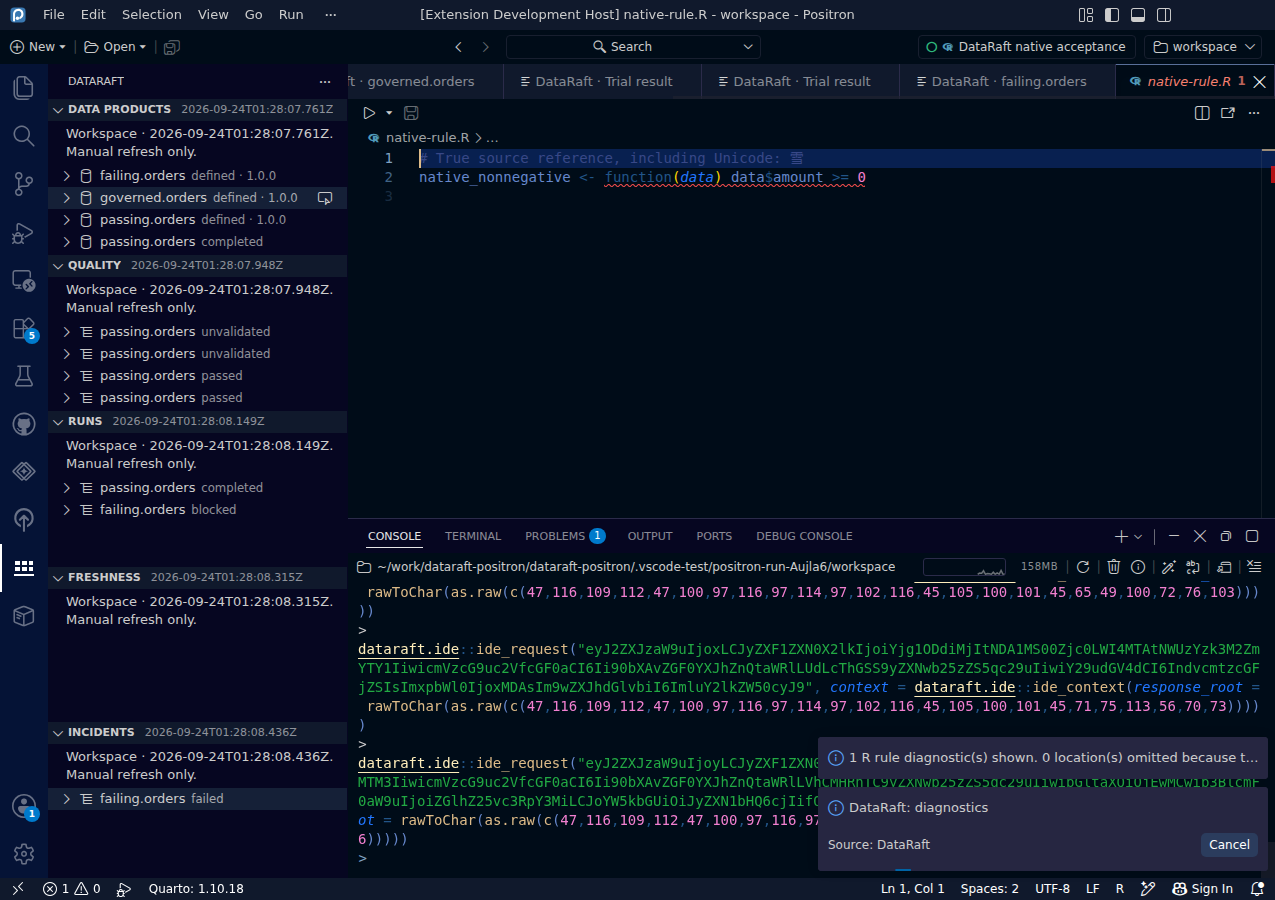
Read the screenshot
The native editor displays the source-reference diagnostic for the nonnegative rule. The location comes from the real R function's source reference. The message identifies the rule and its failed status without transferring failure rows or raw condition text.
Keep in mind
Ordinary formula rules do not provide supported source locations. The file must be unchanged, UTF-8, within the workspace and within the size limit. Dirty or stale buffers receive no marker. Markers clear on edits, refresh and session/context changes. No marker does not mean the rule passed; the command reports omitted locations separately.
0d55d40. Screenshot automation: 0d55d40. Successful native capture run ↗